
When you can’t clearly see the advertisement content under the scorching sun, losing potential customers, or your eyes feel sore and tearful after late-night gaming—this isn’t just an experience issue, but also exposes a mistake in the technology selection.
Want to choose the perfect screen in just 30 seconds? Check this comparison table first, then dive into the detailed guide below.
| Use Case | Best Choice | Why |
|---|---|---|
| Outdoor advertising | LED | High brightness, weatherproof, long life |
| Indoor office use | LED | Cost-effective, good in stable lighting |
| Stage/concert | LED | Modular, quick install, high durability |
| Medical/design work | LCD | High pixel density, accurate color |
| Gaming – esports | LCD | High refresh rates, low input lag |
| Gaming – cinematic | Mini LED | High HDR, deep blacks |
| Vehicle displays | LED | Vibration-resistant, works in extreme temps |
Table of Contents
1. The Evolution of Display Technology: From LCD to LED
2. What’s the Difference Between LED and LCD Displays?
2.1 LCD: A “Light Valve” System That Relies on Backlighting
2.2 LED Displays: Pixels That Emit Light Directly
2.3 “LED TVs” Are Not True LED Screens
2.4 Quick Technology Comparison Table
3. LCD Screen Vs LED Screen in Real-World Scenario
3.1 Indoor Home Displays
3.2 Outdoor Commercial Displays
3.3 Stage Performance Applications
3.4 Vehicle-Mounted Displays
3.5 LCD vs LED for Gaming
4. Long-Term Usage Cost Comparison
4.1 Difference in Hardware Lifespan
4.2 Energy Consumption Comparison
4.3 Maintenance Cost
5. LCD or LED: Which Is Better for Eyes?
5.1 Blue Light Emission Differences
5.2 Flicker Frequency and Dimming Methods
5.3 Brightness Uniformity and Visual Comfort
5.4 Eye Comfort Comparison: LCD vs. LED
6. Environmental Adaptability: LCD Screen Vs LED
7. Business Decision Guide: Choosing Between LCD and LED Displays
8. Common Misconceptions About LED and LCD Screens
9. FAQs
10. Conclusion
First of all, let us understand the definition of LED and LCD to further know which is the best choice for you.
(1) Definition: A display technology that controls light passage (like a shutter) but requires a separate backlight to become visible.
(2) Key Strengths: Cost-effective, slim profile, good readability in well-lit environments.
(3) Commercial Examples:
(1) Definition: A semiconductor device that generates its own light when electricity passes through it.
(2) Key Strengths: Energy-efficient, high brightness, long lifespan, compact size.
(3) Commercial Examples:
The term “LED screen vs LCD screen” is often misunderstood as a simple product comparison.
In reality, it represents a major shift in display technology over the past two decades.
From the early days of cold cathode fluorescent lamp (CCFL) backlit LCD panels to the growing adoption of Mini LED and Micro LED, this is not just an upgrade in brightness and contrast—it’s a transformation in viewing experience.
LCD technology, which matured in the 1990s, relies on a CCFL backlight and the precise manipulation of liquid crystal molecules to create images.
In 2004, the world’s first LED-backlit TV was introduced—it was three times thicker than a standard LCD.
After 2010, LED entered the market in two forms: as a backlight source for LCD panels, and as a self-emissive display technology.
Much of the consumer confusion around “LED screens” stems from the blurry naming conventions of that period.

Today, the conversation revolves around “pixel-level light control,” “self-emissive displays,” and even bendable or transparent LED panels.
Advances in LED technology have reshaped not just screens themselves but also opened up entirely new possibilities for professional applications like advertising, e-sports, and exhibitions.
Why does this technical distinction still matter?
Because choosing the wrong display can cost more than you think. More importantly, many users still misunderstand what “LED screen” actually means.
In fact, over 80% of so-called “LED TVs” still use traditional LCD panels, with only the backlight replaced by LEDs.
These “LED-backlit LCDs” differ fundamentally from true full-color LED displays in both how they generate light and where they’re used.
Just read the form below, you will understand the conception and confusion easily:
| Category | LED Backlight LCD | True LED Display |
|---|---|---|
| Lighting Principle | Liquid crystal layer + LED backlight (Like using an LED flashlight to illuminate a slide) | Self-emissive pixels (Like millions of micro bulbs emitting light directly) |
| Common Products | 80% of so-called “LED TVs” (Misleading naming by brands) | Shopping mall ad screens Concert stage backdrops |
| Price | Affordable (Mainstream for homes) | 5-10x more expensive (Professional use) |
| Core Difference | Only replaced old lamps with LEDs | Completely eliminates liquid crystal layer |
To truly understand the difference between LED and LCD display technologies, it all comes down to one key question: Where does the light come from?
This seemingly simple question reveals the fundamental logic behind display technology—and helps cut through much of the marketing noise.

LCDs (Liquid Crystal Displays) do not emit light by themselves.
They require an external backlight. Light passes through layers of liquid crystals, which control how much light gets through, and then through color filters to form the image.
This indirect lighting method limits LCD performance—blacks aren’t truly deep, response time can lag, and viewing angles tend to be narrower.
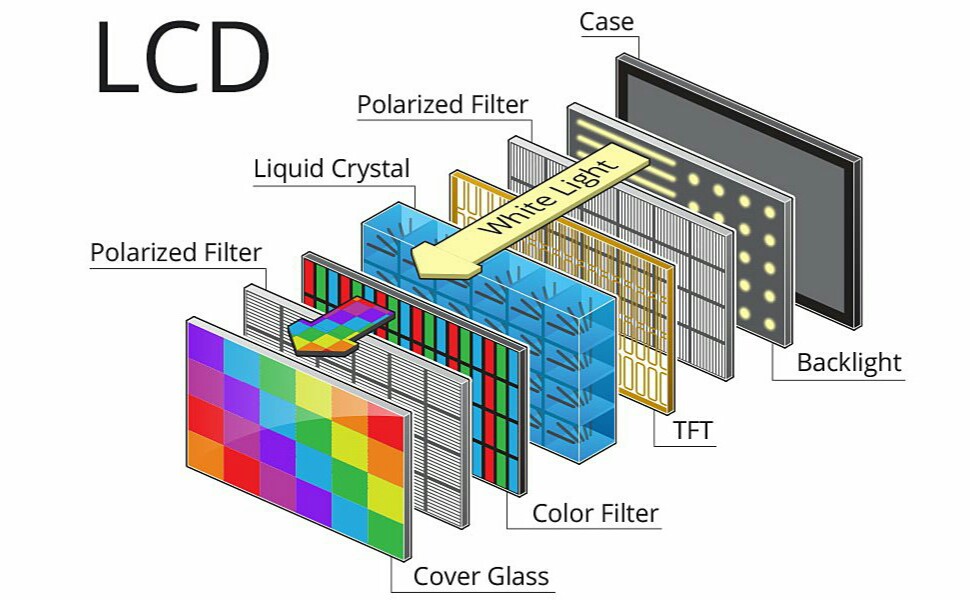
LCD Panel Diagram
True LED displays are completely different. Each pixel is made up of individual LED diodes that emit their own light—no backlight required.
This self-emissive structure offers clear advantages: pixels can be turned off completely (producing true black), response times are up to 1,000 times faster than LCD, and the viewing angle can approach 180° with no color distortion.
Most products marketed as LED TVs are actually LCD screens that simply replace traditional CCFL backlights with LED backlighting.
At their core, they still rely on LCD technology.
True self-emissive LED displays are mainly used in high-end commercial settings—such as large outdoor advertising screens or professional monitoring centers.
If you want a fast, clear understanding of the core differences between the two display technologies, the table below highlights the key distinctions at a glance:
| Feature | LED Display | LCD Display |
| Light Source | Self-emissive (each pixel emits light) | Backlit (liquid crystals control light transmission) |
| Brightness | Higher brightness (2000+ nits, ideal for outdoor use) | Moderate brightness; screen glare in direct sunlight |
| Structure | RGB LED diode array | Backlight + liquid crystals + polarizers + color filters |
| Response Time | Nanosecond-level, ultra-smooth visuals | Millisecond-level, potential motion blur |
| Contrast Ratio | High contrast, true blacks | Limited contrast, blacks appear gray |
| Viewing Angle | Nearly 180°, consistent color from all angles | Narrower angles; color shifts when viewed from the side |
When shopping for a living room TV, many consumers are misled by the term “LED TV” — these are actually LCD screens that use LED backlighting.
They’re reasonably priced, offer sufficient brightness, and are the mainstream choice for most households.
However, if you have higher standards for viewing — such as building a home theater, needing an ultra-large screen, or wanting a more immersive experience — fine-pitch full-color LED screens are emerging as a new option.
They offer higher contrast, wider viewing angles, and flexible splicing for truly frameless, large-format displays, making them ideal for dedicated media rooms or villa setups.
| Comparison Item | LED Backlit LCD TV | Self-Emitting LED Screen |
|---|---|---|
| Price (65 inches) | Lower | Higher |
| Peak Brightness | Moderate (300-500 nits) | Very High (2000+ nits) |
| Visibility in Sunlight | Poor, screen appears gray, visibility <55% | Excellent, clear under direct sunlight |
| Blue Light Exposure | Some models emit strong blue light | Blue light reduced by 15% |
| Contrast Ratio | Moderate | Excellent, deeper blacks |
| Color Performance | Average | More vivid, wider color gamut |
| Lifespan | Average | Longer, better durability |
| Power Consumption | Lower | Higher |
| Recommended Use | Everyday home viewing | Large villas, cinema-level experience |
Outdoor advertising LED screens face harsh environmental challenges.
Real-world measurements show that under direct sunlight, the display performance of LCD screens drops significantly.
In contrast, professional-grade LED displays not only deliver much higher brightness but also offer excellent waterproof and dustproof capabilities.
| Environmental Challenge | LCD Screen | LED Screen | More Durable | Source |
|---|---|---|---|---|
| Heavy Rain (IP Protection) | May suffer water damage | No issues even under heavy rain (IP65/67/68 waterproof) | ✅ LED | Huawei Technology |
| High Temperature (50°C) | Screen turns yellow | Operates normally (can withstand 85°C) | ✅ LED | Hikvision Experiment |
| Extreme Cold (-25°C) | Won’t start | 8-second quick startup | ✅ LED | BYD Test |
Large-scale performances have unique requirements for display screens.
Thanks to their lightweight design and quick setup features, stage LED displays have become the preferred choice for stage construction.
They can withstand frequent transport and installation, with individual panels being lighter and free from visible seams.
In real-world use, some LED screens are even strong enough to support performers standing directly on them — something LCD screens simply can’t handle.
| Requirement | Solution | Key Advantage | Data Support |
|---|---|---|---|
| Artist Foot Traffic | Custom LED Floor Screen | 200 lbs per screen weight capacity | CCTV Stage Technology |
| Quick Assembly | Magnetic LED Splicing | Complete concert screen in 1 hour | Hunan TV Case Study |
| Color Consistency | Full-screen color difference < 1.5 (no visible yellowing) | Superior to LCD | National Standards for Stage Equipment |
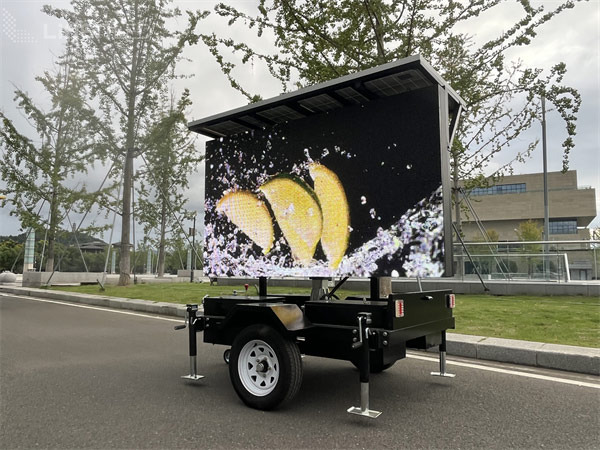
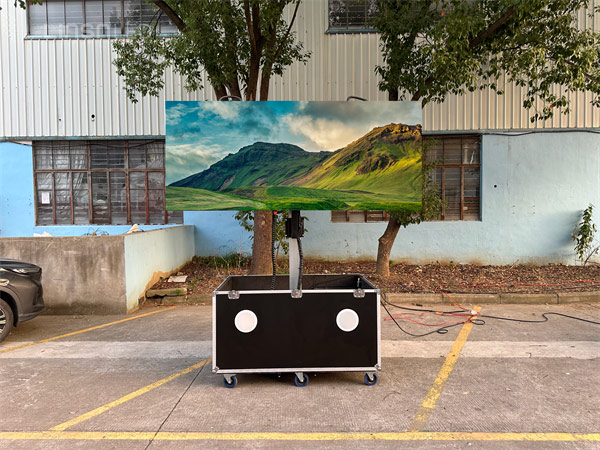
Displays used on vehicles must meet strict vibration resistance standards.
Data from long-term use shows that trailer LED displays have a significantly lower failure rate than LCDs in high-vibration environments.
This is because LEDs don’t rely on fragile backlight modules or liquid crystal layers, making them more resilient to mechanical impact.
Additionally, LED screens perform more reliably under extreme temperatures, making them well-suited for regions with large temperature fluctuations.
There are three main display technologies worth noting in today’s gaming market:
Traditional LCD gaming monitors still dominate, especially those with refresh rates above 240Hz.
These monitors offer fast response times and are relatively affordable, making them the go-to choice for many professional teams during training.
However, they tend to fall short in contrast ratio (typically around 1000:1) and deliver limited HDR performance.
When it comes to color accuracy, high-end LED displays can cover up to 99% of the DCI-P3 color gamut, outperforming standard LCDs which typically reach around 95%.
In addition to conventional LCD and LED screens, the gaming world has seen the rise of emerging technologies like Mini LED monitors, which deliver enhanced brightness control and visual fidelity.
These are considered high-end niche products suited for specific scenarios.
| Metric | Home Gaming Monitor (LCD) | Console/Media Use (Mini LED) | Pro Venue Display (LED) |
| Motion Smoothness | Very smooth (360Hz) | Moderately smooth (144–240Hz) | Ultra-smooth (3840Hz+) |
| Input Lag | Almost none (0.5ms) | Fast response (1ms) | Real-time (nanosecond level) |
| Color & Brightness | Good (HDR600) | Better (HDR1000+) | Excellent (HDR2000+) |
| Suggested Usage | Esports, Internet cafés | Home entertainment, consoles | Esports arenas, events |
| Game Type | Recommended Screen | Key Parameters | Effect Comparison |
|---|---|---|---|
| Esports (CS2/PUBG) | High-Speed LCD | 0.5 ms response time | Stay one step ahead |
| Console Gaming (PS5) | Mini LED TV | 1000+ zone local dimming | More details in dark scenes |
| Outdoor Mobile Gaming (Honor of Kings) | High-Brightness LED Screen | 1200 nits brightness | Clear visibility under sunlight |
Many users tend to focus only on the initial price and overlook the Total Cost of Ownership (TCO) over 5 or even 10 years.
However, for businesses or engineering projects, the key factor in choosing a display device is not “which screen is cheaper,” but “which screen is more reliable, durable, and cost-effective in the long run.”
The core component of LED displays is the light-emitting diode, which supports long-term operation under high-intensity usage.
The Mean Time Between Failures (MTBF) of LED screens can reach 50,000 hours, significantly higher than the 30,000 hours of most LCDs.
Especially in high-frequency usage scenarios such as digital signage, advertising trucks, and outdoor commercial displays, LED displays demonstrate stronger engineering-grade stability.
When users search for LCD screen vs LED, energy consumption is often one of their top concerns.
Take a 65-inch commercial screen as an example: the average power consumption of an LED display is around 180W, while an LCD of the same size can reach 240W.
Over five years of 24/7 operation, this difference can save thousands of dollars in electricity costs alone.
For applications such as advertising displays and traffic guidance screens that require continuous operation, the energy efficiency advantage of LED becomes even more significant.
In addition, modern LED displays support automatic brightness adjustment and zoned smart control, further optimizing energy use.
| Screen Type | Power (kW) | Daily Cost | Monthly Cost | Annual Cost | 5-Year Cost |
|---|---|---|---|---|---|
| LED | 0.18 kW | $0.52 | $15.55 | $189.22 | $946.08 |
| LCD | 0.24 kW | $0.69 | $20.74 | $252.29 | $1,261.44 |
| Savings | – | $0.17/day | $5.19/month | $63.07/year | $315.36 |
This table highlights the key differences between LED and LCD displays in terms of design, cost, functionality, and reliability.
| Comparison Item | LED Display | LCD Display |
|---|---|---|
| Structural Design | Modular architecture allows quick replacement of individual pixel modules | Enclosed structure, making repairs more difficult |
| Maintenance Cost | Average maintenance cost is less than 0.5% of the equipment’s value | Often requires full-unit replacement (e.g., backlight failure, panel aging), leading to higher costs and longer repair cycles |
| Common Issues | Independent module replacement without affecting overall performance | Potential issues like image retention |
| Power Redundancy | Supports N+1 power redundancy; automatically switches to backup to avoid full-screen failure | Typically lacks power redundancy |
| Remote Monitoring | Supports remote monitoring for timely fault resolution | Generally lacks remote monitoring capability |
| Applicable Scenarios | High-availability environments like airports and conference centers | Scenarios with higher tolerance for failures |
| Long-Term ROI | Higher initial cost but easier maintenance and longer lifespan | Lower initial cost but higher long-term maintenance costs |
LCD vs LED: full screen vs module replacement

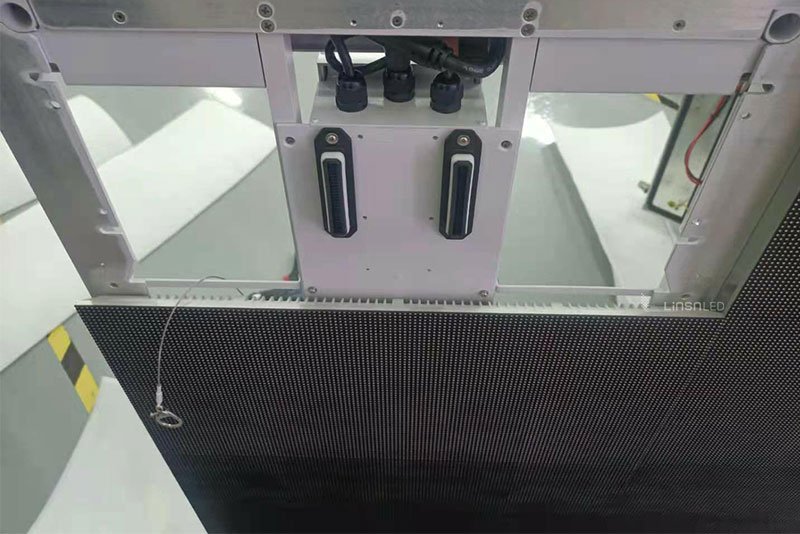
LED displays use a modular architecture, allowing for quick replacement of individual pixel modules without affecting the overall system performance.
On average, the maintenance cost accounts for less than 0.5% of the equipment’s value.
In contrast, LCDs have a more enclosed structure.
Common issues such as backlight failure or panel aging often require entire unit replacements, resulting in higher costs, longer repair cycles, and potential problems like image retention.
Moreover, LED systems support N+1 power redundancy and remote monitoring.
If a fault is detected, the system can automatically switch to a backup power source, avoiding full-screen outages caused by a single point of failure.
This is especially critical in airports, conference centers, and other high-availability environments.
In short, the difference between LED and LCD goes beyond brightness and image quality—it’s a long-term game of investment versus return.
The impact of screen technology on visual health mainly depends on three optical factors: blue light emission, dimming mechanism, and brightness uniformity.
LCD displays typically emit blue light with a peak wavelength around 450nm.
Some models reduce potential eye strain by shifting the peak slightly to 460nm using blue light filtering or low blue light modes.
In contrast, LED screens have a narrower blue light spectrum, and measurements show that harmful blue light in the 415–455nm range is usually 15–20% lower than that of LCDs.
Note: Some low-end LED screens may emit higher levels of blue light if they lack proper filtering or blue light suppression technologies.
Be sure to check certifications and specifications when choosing a display.
Flicker is a key contributor to eye strain.
Most high-end LCD monitors use DC dimming, which eliminates visible flicker entirely.
In contrast, some LED displays rely on PWM (Pulse Width Modulation) dimming.
If the PWM frequency is below 250Hz, it can cause visual discomfort, especially at low brightness levels.
However, modern high-quality LED displays have significantly improved in this area, with many now offering PWM frequencies of 3000Hz or higher.
At these levels, flicker is virtually imperceptible to the human eye, and such displays are even used in medical-grade imaging systems.
(1) Brightness Stability: LED displays, which do not require a backlight layer, generally offer more uniform brightness, reducing local overexposure and glare.
(2) Contrast Performance: LEDs typically deliver much higher contrast ratios than LCDs, minimizing frequent pupil adjustments and helping to ease eye fatigue.
(3) Anti-Glare Coatings: Both LCD and LED screens can be treated with AG (anti-glare) coatings, which effectively reduce mirror-like reflections by up to 40%.
| Feature | High-End LCD Monitor | Premium LED Display |
| Blue Light Risk Factor | 0.6 – 0.8 | 0.4 – 0.6 |
| Dimming Method | DC Dimming | High-Frequency PWM (≥3000Hz) |
| Brightness Fluctuation | < 5% | < 3% |
| Contrast Ratio | ~1,000:1 | Up to 1,000,000:1 (HDR) |
Thanks to advances in blue light control and high-frequency dimming, LED displays now offer superior visual comfort—provided you choose models with certified eye care features.
For users who spend long hours in front of a screen, such as surveillance operators, backstage crews, or avid gamers, a high-quality LED display can be a more eye-friendly choice.
When it comes to harsh outdoor environments that truly test product reliability, LED displays show significantly stronger adaptability compared to LCDs.
Professional LED screens are built with fully sealed structures and typically rated at IP65, offering strong resistance to water, dust, and salt spray.
This allows them to operate reliably even in extreme weather conditions such as heavy rain or sandstorms, making them ideal for coastal areas, industrial zones, and other settings where durability is critical.
In contrast, LCD displays—due to the delicate nature of their liquid crystal layers—are more sensitive to temperature and humidity fluctuations.
Under high or low temperatures, they are more prone to display issues or even backlight system failures.
Real-world project data also highlights this difference: LED screens used continuously outdoors for five years report an average failure rate of just 3–5%, while LCDs tend to experience failure rates of 15–20%.
This gap is largely due to the modular design of LED panels—if one module fails, it can be replaced on-site in about 15 minutes.
In comparison, a backlight failure in an LCD often requires returning the entire unit for repair, resulting in longer downtime and higher maintenance costs.

Under strong lighting conditions, LED displays have a clear advantage over LCDs due to their self-emissive technology.
Tests show that even when ambient brightness reaches 100,000 lux, LED screens maintain clear and vivid image quality, while LCDs tend to suffer from heavy glare and washed-out visuals, significantly reducing visibility.
High-quality LED displays can operate reliably across a wide temperature range—from -40°C to 70°C—with fast startup and stable performance.
By contrast, LCDs often struggle to start below 0°C, and in high-temperature environments, they are prone to brightness drops and color distortion.
For you to have decisions quickly, here’s a structured comparison table summarizing the key points for choosing between LCD and LED displays in different common business scenarios:
| Application Scenario | Recommended Display | Key Advantages | Typical Use Cases |
|---|---|---|---|
| Outdoor/Engineering-Grade | LED | High brightness, waterproof/dustproof, easy maintenance, long lifespan | Coastal city billboards, highway traffic screens, 24/7 commercial displays |
| Dynamic Events | LED | Modular splicing, quick assembly/disassembly, portable | Concert stages, trade shows, mobile advertising vehicles |
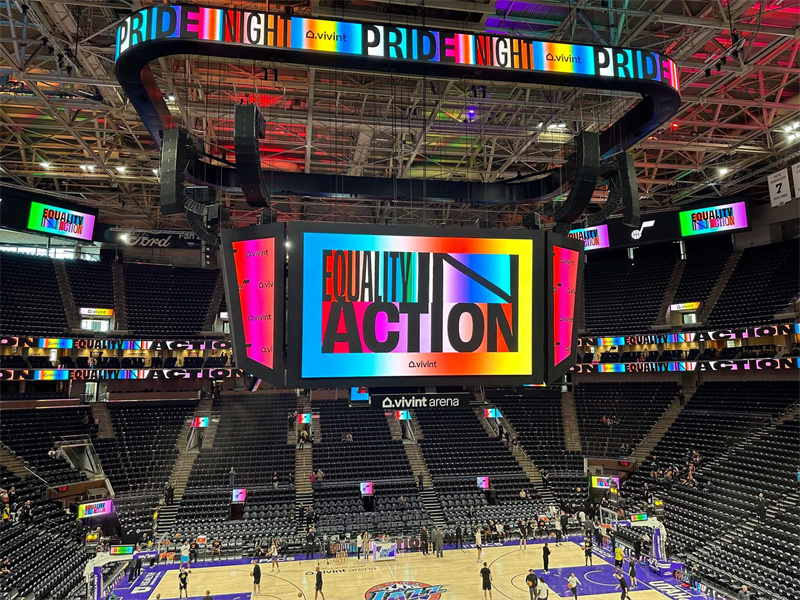
| Stadiums & Large Venues | LED | Ultra-wide viewing angles, long-distance visibility, real-time info + advertising | Sports arenas, concert halls, large public displays |
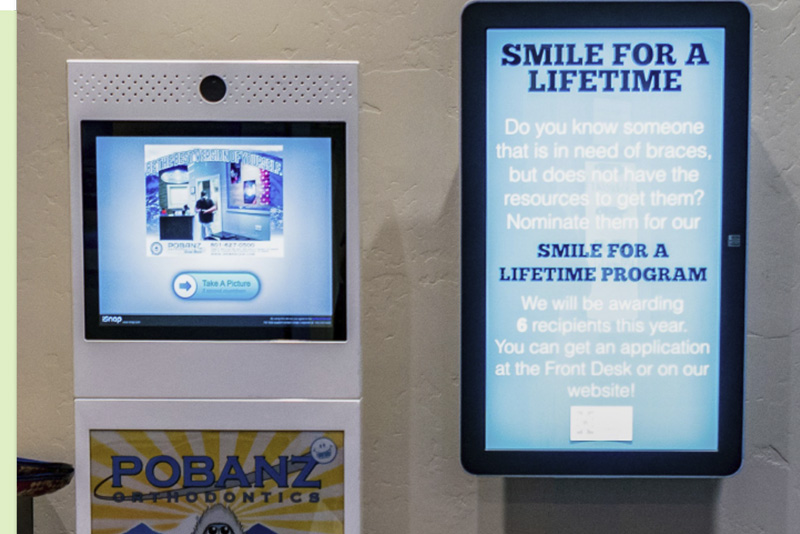
| Indoor (General Use) | LCD | Cost-effective, easy deployment, lower brightness needs | Office meeting rooms, hospital kiosks, mall wayfinding |
| High-Precision Imaging | LCD | Superior color accuracy, high pixel density, wide viewing angles | Medical imaging, design monitoring, text-based info systems |
For outdoor or engineering-grade applications—such as those used by advertising operators, government agencies construction companies, and retail chains—LED displays are often the more reliable choice.
They offer high brightness, strong waterproof and dustproof performance, and easy maintenance, making them well-suited for complex environments
Whether it’s outdoor advertising in coastal cities, traffic guidance screens on highways, or largescale commercial displays that need to run around the clock, LED displays consistently deliver excellent stability and long lifespan.

For live stages, trade shows, or mobile advertising vehicles, LED displays support modular splicing and quick assembly/disassembly, making transport and installation more efficient.
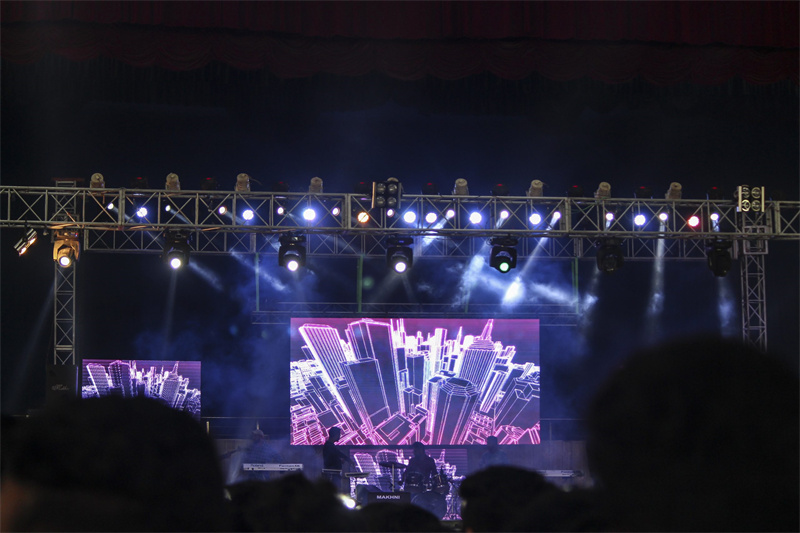
In large stadiums, LED screens can easily cover long distances and ultra-wide viewing angles, meeting the dual demands of real-time information display and commercial advertising.
For indoor environments or smaller display areas, LCD screens remain a competitive option.
Applications such as office meeting rooms, hospital registration kiosks, and mall wayfinding displays typically require lower brightness and operate in more stable conditions, where LCD’s cost-effectiveness and ease of deployment make it a practical choice.
Additionally, in industries where close-up viewing, high pixel density, and detailed image quality are essential—such as design monitoring, medical imaging, and text-based information systems—high-end LCD displays still deliver superior color accuracy and wider viewing angles.


So before deciding between LED and LCD technologies, ask yourself a few key questions:
By evaluating these factors carefully, you can choose the display solution that truly aligns with your business goals.
Despite the technical differences between LED and LCD, many users still hold onto some common misunderstandings. Let’s clear them up:
Most so-called LED TVs are actually LCD panels with LED backlighting. They do not use self-emissive LED pixels like commercial LED displays.
Only fine-pitch full-color LED screens used in signage, events, or monitoring systems are true LED displays.
Most so-called LED TVs are actually LCD panels with LED backlighting. They do not use self-emissive LED pixels like commercial LED displays.
While the upfront cost of LED screens is higher, their longer lifespan, energy savings, and modular maintenance often make them more cost-effective over 5–10 years.
For 24/7 usage scenarios, LED is the smarter investment.
LCDs are not waterproof or dustproof by default. Extreme temperature shifts or humidity can damage the internal liquid crystal layer.
LED panels, especially those rated IP65 and above, are built for outdoor resilience and are used widely in coastal cities, high-vibration vehicles, and industrial zones.
A: The key lies in the light-emitting principle.
LCDs rely on backlighting that passes through liquid crystals to form images, while LED are self-emissive—each pixel produces its own light.
As a result, LED displays offer true blacks, faster response times, and higher contrast ratios.
A: This is a marketing misnomer.
These “LED TVs” are actually LCD screens with LED backlighting, replacing the older CCFL backlight technology.
The core display technology is still LCD.
True LED—where each pixel emits light—are mostly used in commercial applications like large-format advertising displays.
A: If you’re on a budget, high-end LCDs (such as those with IPS panels) are a solid choice.
If image quality is a priority, consider Mini LED or OLED.
Basic LED options offer good value, but note: direct-lit LED panels generally provide better image quality, while edge-lit panels are slimmer but may suffer from uneven brightness.
A: It depends on the frequency.
Lower-end LED screens with PWM dimming frequencies at or below 250Hz may cause eye fatigue.
However, professional-grade displays—such as those used in medical or gaming contexts—often use DC dimming or high-frequency PWM (3,000Hz or higher), minimizing any perceivable flicker.
A: Two major drawbacks:
LCD brightness usually caps at around 500 nits, making them unreadable in direct sunlight (where LED screens can exceed 2,000 nits).
LCDs struggle in extreme cold; their liquid crystal response slows below -20°C.
In contrast, LED screens can operate in temperatures as low as -40°C—ideal for outdoor signage and traffic guidance systems.
A: Yes.
Mini LED enhances LCD performance by introducing thousands of local dimming zones, significantly boosting contrast (e.g., Apple’s Pro Display XDR).
MicroLED, on the other hand, is a true self-emissive technology—offering the benefits of OLED without burn-in issues.
However, it remains costly for now (e.g., Samsung’s “The Wall”).
A: Competitive gamers: Fast IPS LCD panels (up to 360Hz) offer excellent speed.
Story-driven gamers: Mini LED displays are ideal for immersive HDR performance.
eSports venues: Fine-pitch professional LED screens deliver zero latency and seamless visuals.
A: With a generous budget: Choose an all-in-one LED display—seamless, durable, and sleek.
On a tighter budget: Go for ultra-narrow bezel LCD video walls (as slim as 0.88mm—about the thickness of a credit card).
However, be aware that long-term use can lead to inconsistent brightness across panels.
A: Three main advantages:
Better vibration resistance (no fragile liquid crystal layer)
Wide operating temperature range (-40°C to 85°C)
Superior visibility in bright daylight compared to LCDs.
After a thorough comparison, we arrive at a key takeaway: both LED and LCD technologies offer distinct, irreplaceable advantages.
The optimal choice depends on your specific use case and long-term requirements.
Here are some tailored recommendations for different user groups:

If your main needs are watching TV and everyday entertainment, an colorful LCD panel with LED backlighting remains the most cost-effective option.
For those seeking a cinematic viewing experience, consider an OLED TV (a subset of LED technology), which delivers stunning visuals with its infinite contrast ratio.
For children’s rooms, LCD screens with DC dimming are recommended, as they emit less blue light.
Outdoor advertising operators should prioritize fine-pitch LED displays (P2.5–P4).
These offer high brightness and a modular design that can significantly reduce maintenance costs.
Data shows that customer retention rates for LED-based billboards are 42% higher than those using LCD.
For conference room setups, Mini LED backlit displays are ideal—they offer accurate color performance while avoiding OLED’s risk of burn-in.
Competitive gamers (e.g., FPS titles): A high-refresh-rate LCD monitor (240Hz or above) is recommended.
These deliver smooth visuals with fast response times, supporting quicker reactions in fast-paced games.
AAA game enthusiasts (e.g., RPGs, open-world games): A monitor with Mini LED backlighting is ideal for rich contrast, more detailed lighting, and superior HDR effects, enhancing overall immersion.
Esports venues and professional competitions: High-refresh-rate LED video walls (3840Hz or higher) are the go-to solution, eliminating motion blur and ensuring razor-sharp clarity in every frame.
We have over 15 years of project experience in the LED display industry, working with advertising media companies, government publicity departments, and international clients.
If you’re still unsure about which LED product suits your needs, feel free to explore more of our technical articles—especially our in-depth guide on LED screen vs LCD screen—or contact us directly for one-on-one consultation.
Last updated: December 2025
Send us a message at any time if you have any problems or quotes, and our professional team will reach out you in 24 hours.
Building 2, Hongfa High-tech Park, Shiyan Street, Baoan District, Shenzhen, China.
Email: sales@linsnled.com
Phone: +86-186-7583-4292
Ⓒ 2010-2026 All Rights Reserved by Shenzhen Linsn LED Co.,Ltd.