

Table of Contents
1. Key Features of LED Screens for Meetings
2. Top 7 Benefits of Using a Conference LED Screen in Meeting Rooms
3. Common Display Options for Meeting Rooms
3.1 Meeting Room LED Display
3.2 LCD Display
3.3 Touchscreen Displays
3.4 Projectors and Projection Screens
3.5 Video Walls
3.6 All-in-One Conference Room LED Display
4. AIO Conference Room LED Display Vs. Traditional LED Display
5. Conclusion: Choose the Right Display Technology for Your Meeting Room
Uses modular splicing technology, allowing each module to be individually removed or replaced without dismantling or replacing the entire display unit.
Supports multiple installation methods, including wall-mounted, suspended, and stand-mounted options.
The installation can be tailored to fit the layout and spatial requirements of the meeting room.
In addition to standard rectangular screens, it supports custom shapes such as curved, circular, and triangular designs, catering to diverse aesthetic and functional needs.
Enables distributed control and centralized management, allowing signal distribution and processing between modules.
Users can adjust displays for different areas as needed.
Provides a high refresh rate to handle dynamic scenes, ensuring smooth and seamless visuals during presentations or video playback.
Indoor LED display delivers exceptional brightness and color performance.
This is especially beneficial for presenting detailed charts, high-definition videos, or real-time data during meetings.
They are highly energy-efficient and boast a lifespan of up to 100,000 hours.
They are highly reliable even with prolonged use, making them ideal for high-frequency operational scenarios.
Images remain consistent and vibrant regardless of the viewing angle, ensuring that attendees can enjoy optimal visuals from any position in the meeting room.
This feature is particularly advantageous for large conferences, presentations, or discussions, ensuring accurate information delivery.


Linsn LED Custom Case P3.91 indoor-Brazil
Modern LED screens feature sleek and lightweight designs, adding a contemporary touch while simplifying installation.
They are ideal for meeting rooms with limited space, maximizing spatial efficiency.
They can be spliced into large displays, offering a seamless viewing experience.
This feature is ideal for meetings that require multi-screen content or the presentation of complex visuals.
It support real-time updates, allowing quick adjustments during meetings.
This capability is especially valuable for scenarios that demand quick responses and frequent updates, such as data reporting, live voting results, or agenda changes.
Equipped with multiple input options, such as HDMI, VGA, and DP interfaces, they are compatible with a variety of devices, including computers, cameras, and smartphones.
In modern businesses, selecting the right display solution for meeting rooms can significantly enhance communication efficiency, presentation quality, and interaction experience.
Depending on specific meeting requirements, the following display technologies each offer unique advantages suited to different scenarios and budget considerations.
With its superior brightness, color precision, and extended lifespan, the LED display is an excellent choice for high-end conference rooms.
This advanced display technology delivers remarkable image quality, making it ideal for a range of meeting environments:
(1) Brightness and Color Accuracy: The display maintains clarity and vibrancy even in well-lit spaces, making it perfect for large meetings and venues with numerous participants.
(2) Long-Term Efficiency: Its stability over time and minimal maintenance requirements ensure reliable performance over an extended period.
(3) Space Adaptability: The display can be tailored and installed to suit the layout and size of any conference room, providing the flexibility to meet diverse spatial demands.

Known for their more affordable price and excellent display quality, they remain the preferred choice for many small to medium-sized conference rooms. They feature:
(1) Clear Image and High Resolution: LCD displays provide detailed image quality, making them especially suitable for presenting documents and data.
(2) Cost-Effective: When working within a budget, it is a highly cost-efficient option.
(3) Ideal for Smaller Spaces: Perfect for small or medium-sized conference rooms, helping to save space.
While the brightness and viewing angles of LCD displays are slightly inferior to LED, their stability and long lifespan in everyday use make them a widely used technology.
Touchscreen displays provide strong interactivity for meetings, making them ideal for situations that require real-time editing, presentation, or discussion:
(1) Real-time Interaction and Presentation: Attendees can directly interact with the touchscreen to edit content, annotate, or switch between presentations.

(2) Enhanced Meeting Engagement: They make discussions more dynamic and increase interactivity, making them perfect for meetings that require team collaboration.
(3) Integrated Functions: Many touchscreen devices come with integrated features like whiteboarding and document sharing, further enhancing meeting efficiency.
Although the display quality and durability of touchscreens may not match traditional display devices, their high interactivity makes them particularly suitable for innovative meetings.

Projectors and projection screens are widely used in meetings that require the display of large-scale content. Their advantages include:
(1) Large Screen Display: Ideal for scenarios that need to present full-screen content or multiple sources, such as large meetings or training sessions.
(2) Cost-effectiveness: Compared to high-end LED and LCD displays, projectors are typically more cost-effective.
(3) Flexibility: Projection screens can be easily adjusted to fit different room sizes, offering versatile display options.
However, projectors are sensitive to ambient light, which can interfere with the display quality.
They also require regular calibration and maintenance.
A video wall is made up of multiple display panels joined together to create a massive, seamless display, making it perfect for large-scale presentations, showcases, and meetings:
(1) Large Display Area: Ideal for situations that require the display of large amounts of information, capable of showing multiple contents at once.
(2) High Resolution and Visual Impact: Video walls provide ultra-high-definition quality, delivering an impressive visual experience.
(3) Customization and Flexibility: They can be customized and installed according to the specific needs of the conference room, providing excellent display quality.
While the initial investment for this device is higher, its value in large-scale meetings and events cannot be underestimated.
The all-in-one conference room LED screen integrates the screen, touch control, and computer functions, making it an ideal solution for modern, efficient meeting needs.
Key Features:
(1) Detailed Presentation
Equipped with P1.56mm pixel pitch LED technology, it delivers fine, clear image quality with vibrant colors and uniform brightness.
Whether viewed up close or from a distance, it ensures crisp and clear presentation of meeting content.
(2) Integrated Design
This system combines the display, operating system, audio equipment, camera, and control panel into one compact unit, eliminating the need for multiple external devices.
This results in a tidier, more organized meeting environment with fewer cables and simplified device management.

(3) Interactive Features with Smart Operating System
The built-in smart operating system (such as Android or Windows) supports wireless projection and touch interaction, allowing participants to mirror screens in real time from mobile phones, tablets, laptops, and other devices.
It makes sharing and collaborating on documents, videos, and images easy and efficient.
(4) Easy Installation and Maintenance
Supports front maintenance, so installation and routine upkeep can be done without complex tools.
Whether wall-mounted or placed on a stand, the setup is quick, space-saving, and ready for immediate use.

(5) High Reliability and Longevity
Using GOB (Glue on Board) protective technology, the LED modules are highly durable and pressure-resistant, with dustproof and scratch-resistant features.
The built-in heat dissipation system ensures long-term stability, reducing maintenance costs.
(6) Comprehensive Multi-Function Support
Supports a wide range of interfaces, including HDMI, USB, audio output, Wi-Fi, and Bluetooth, allowing connections to cameras, speakers, laser pointers, and other common peripherals.
It also supports 4K video decoding and multi-platform wireless screen mirroring, enabling seamless collaboration and real-time interaction across various platforms.

Although traditional displays are widely used in many conference rooms, the all-in-one system offers a more efficient LED display solution in terms of functionality integration, ease of use, and space optimization.
The following comparison highlights the key differences between the two.
Comparison Factor | Traditional LED Display | AIO LED Display |
Integration | Requires additional devices such as speakers, cameras, etc., making installation complicated and occupying more space. | Integrated design combining display, audio, camera, and operating system, reducing the need for external devices and simplifying installation. |
Functionality | Primarily used for content display; additional functions like video conferencing and wireless projection require extra equipment. | Built-in operating system supporting wireless projection, video conferencing, touch interaction, and other conference features. |
Installation & Maintenance | Complex installation requiring professional help, with time-consuming device setup and maintenance tasks. | Modular design with front maintenance support, allowing for easy installation and maintenance without professional assistance. |
Visual Effect & Experience | Traditional LED displays excel in brightness and resolution but may be affected by space and viewing distance in smaller, high-precision displays. | High resolution, uniform display offering accurate color reproduction, especially suited for close-range viewing and fine-detail presentation. Built-in audio and camera ensure a premium experience. |
Multi-Device Collaboration | Device connection is less flexible, and collaboration with multiple devices can be complex. | Supports wireless projection from multiple platforms, allowing up to 4 devices to project simultaneously, simplifying collaboration. |
Display Performance | Suitable for large-screen displays with high brightness, adaptable to different environments. | High resolution with uniform display, perfect for close-up viewing and accurate color representation. |
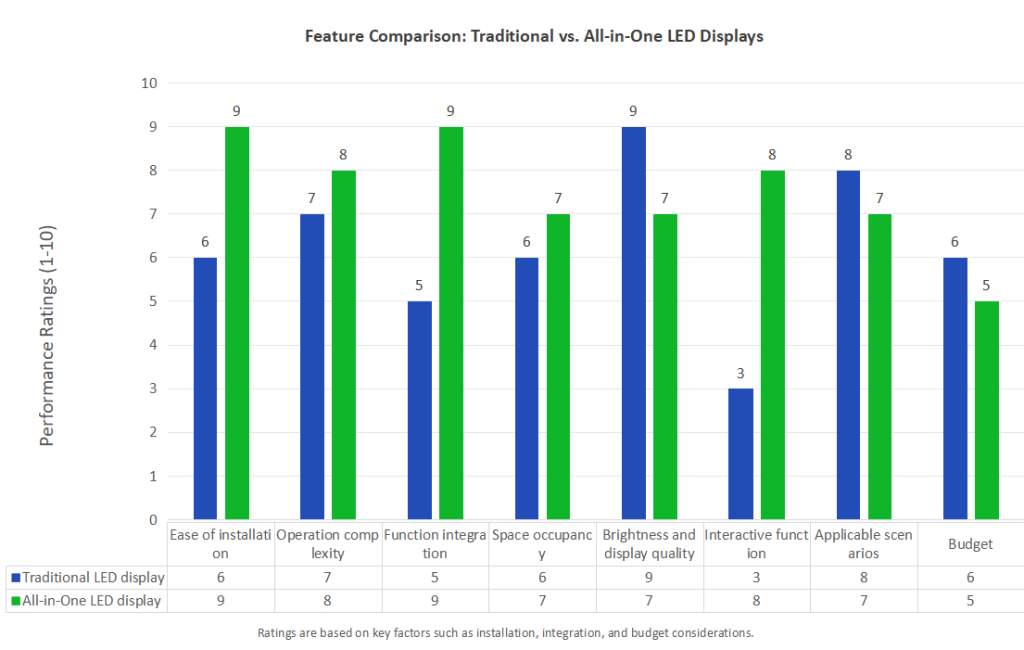
In order to more clearly compare the performance of traditional LED displays and AIO LED display screens, we conducted detailed scoring from multiple dimensions such as installation ease, operation complexity, and functional integration.
The results are shown in the figure below.
Selecting the right display technology can significantly enhance meeting efficiency and interactivity.
Each solution has its unique advantages, and understanding these differences will help you make an informed decision.
The all-in-one LED display is the ideal choice. With integrated display, audio, video conferencing, and operating systems, it simplifies device management.
It’s perfect for businesses that frequently hold video meetings and require real-time data sharing, especially in tech companies and educational institutions.
Traditional LED displays are ideal for large-scale presentations, offering superior brightness and color performance.
They are well-suited for large meetings, exhibitions, and other high-visibility events, providing clear visuals in various lighting conditions.
However, additional equipment is needed to support video conferencing and other features.
LCD displays are a cost-effective choice, ideal for small to mid-sized meeting rooms.
While they offer lower brightness and viewing angles compared to LEDs, they still provide stable display performance, making them suitable for displaying basic documents and data.
Touchscreens and all-in-one LED displays are excellent choices.
They support real-time editing and sharing, making them perfect for business discussions or creative meetings that require high interactivity.
Choose the right conference LED screen based on your meeting room’s size, display requirements, and budget.
For large-scale presentations, consider LED displays. For streamlined, efficient environments, All-in-One systems are a great option.
If you’re working within a limited budget, LCD displays or touchscreens may be the right fit.
By understanding the strengths of each technology and aligning them with your specific needs, you’ll ensure that your meeting space is efficient, modern, and highly interactive.
Send us a message at any time if you have any problems or quotes, and our professional team will reach out you in 24 hours.
Building 2, Hongfa High-tech Park, Shiyan Street, Baoan District, Shenzhen, China.
Email: sales@linsnled.com
Phone: +86-186-7583-4292
Ⓒ 2010-2026 All Rights Reserved by Shenzhen Linsn LED Co.,Ltd.


